
Stone Works!
reviewed by Robert Pritchett
Stone Design Corporation PO Box 6799 Albuquerque, NM 87197-6799 1-505-345-4800 FAX: 1-505-345-3424 Released: July 17, 2006 $399 USD http://www.stone.com/store/shop.pl/page=products.htm 30-day try-before-you-buy: http://www.stone.com/tutorials/Licensing/Free_License_1.html Download: http://www.stone.com/NewDownload.html Requirements: Mac OS X 10.1 or later. Forums: http://www.stone.com/stoneforum/ Languages: English, Deutsch, 日本語, Espa–ol, Fran�ais, Italiano, Svenska, or Dansk! Philosophy: http://www.stone.com/Philosophy/Philosophy.html Resources: http://www.stone.com/Stone_Design_Resources.html Successes: http://www.stone.com/Stone_Studio_Successes/ Tutorials: http://www.stone.com/tutorials/index.html Strengths: Just-in-time software for just-enough users. Weaknesses: DoesnÕt have thousands of options, just those needed. Other Reviews: http://www.stone.com/Reviews/ Reviewed on an iMac G5 with Mac OS X 10.4.7. Discussed in Mac ReviewCast #65: http://www.surfbits.com/?p=851 |
|




What is the difference between Stone Studio and Stone Works? Would you believe $100 USD? How about seven more apps? While Stone Studio is an amalgam of 7 apps - Create, PhotoToWeb, TimeEqualsMoney, SliceAndDice, PStill, PackUpAndGo and GIFfun, Stone Works also consists of iMaginator, StampInStone, GlobalWarmth, FontSight and PreferenceCommander, Videator and a new Stone Studio Widget.
Way back in 2003, we reviewed Stone Studio. True to his word, Andrew Stone has provided Òfree updates for lifeÓ. And even when IÕve switched machines, lost registration codes and been a nuisance, Andrew Stone has kindly resent that information more than once and has done so gladly, happily and without complaint.
Elsewhere in this edition of macCompanion, we already reviewed two of the Stone Works apps – iMaginator for image processing and Videator for creating and adding special effects for movies. While doing these reviews, Videator was updated and so was Stone Studio.
Besides all these sweet apps, Stone Design also gives away software such as DOCtor, an MS Word to PostScript and PDF convertor and TrueBlue, a TrueType to PostScript Type 1 font convertor. And Stone Design Corporation has been constantly upgrading and adding to their software suite since 1984. Check out their history; http://www.stone.com/Stone_Design.html and their philosophy of doing business; http://www.stone.com/Philosophy/Philosophy.html

All these apps were designed for AppleÕs ÒeverymanÓ. Each app can be purchased separately and runs itÕs own genre between shareware and much higher priced ÒCommercialÓ software. If you purchased each app separately, you would be paying that higher ÒProÓ price so you are way better off just getting the whole package and be done with it. Each one addresses specific issues and you can get soup-to-nuts all-meal deal or just taste the entrŽes. Sean Ashcroft does a pretty good job hitting some of the Stone Studio apps in the May issue of MacWorld UK, but you need to be a subscriber to view it http://www.macworld.co.uk/reviews/ or go see the scanned article on Stone.comÕs website listed above under ÒOther ReviewsÓ.
The real power of these apps is in how they work together in a synergistic manner, and with time, IÕve seen these each of these apps get just a little better with each rev. To see just how each app works, check out the Tutorials linked above.
To see some of the synergy, go here: http://www.stone.com/StoneStudio/explained/index.html
Not all the apps are shown in
this 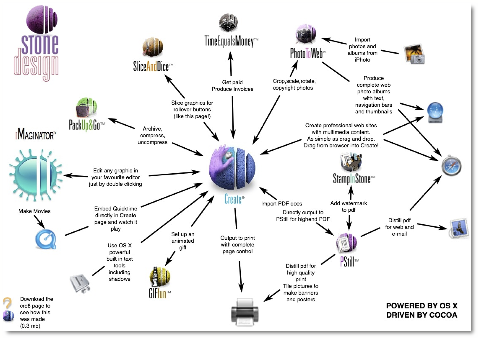 diagram, but you get the
idea.
diagram, but you get the
idea.
So even with this quick look at Stone Works, can you see why we would get excited about Andrew StoneÕs vision and expertise? He has taken his dream and made it reality. Now itÕs your turn.
