
Intego Security Suite – Internet Security Barrier X4 Platinum Edition – A Real Big Security Blanket
reviewed by Robert Pritchett
Intego 500 North Capital of Texas Highway Building 8-150 Austin, Texas 78746 USA 1-512- 637-0700 Fax: 1-512-637-0701 sales@intego.com http://www.intego.com/home.asp http://www.intego.com/isb/home.asp Released: ChatBarrier X4 10.4, ContentBarrier X4, 6-6-06; Personal Backup X4 10.4.5, 6-15-06; Personal AntiSpam X4 10.4, 04-15-06; NetBarrier X4 10.4.1, 2-27-06; VirusBarrier X4 10.4.3, 01-17-06. $150 USD Single-user. There are also 5 and 10-user licenses. Try-before-you-buy; http://www.intego.com/demo/ Annual Service Updates, $30 USD per year each. Comes with: NetBarrier X4, VirusBarrier X4, ContentBarrier X4, Personal Backup X4, ChatBarrier X4, Personal Antispam X4. Requirements: ContentBarrier X4 and Personal Backup X4 – Kids; Mac OS X 10.2.8 or later; 40 MB hard drive space each. Internet Security Barrier X4 AntiSpam (with NetBarrier X4, VirusBarrier X4 and Personal AntiSpam X4) – Internet connection; Mac OS X 10.2.8 or later and 70 MB hard drive space. ChatBarrier X4 requires Mac OS X 10.3.9 or later and 10 MB of hard drive space. Strengths: One-stop shop for all Mac security concerns. Weaknesses: ContentBarrier X4 Òtakes overÓ, even when it is disabled. So does VirusBarrier X4. Versiontracker comments are harder than I am on Intego: http://www.versiontracker.com and search on Intego. License Agreement: http://www.intego.com/buynow/license.asp Discussed in Mac ReviewCast #64: http://www.surfbits.com/?p=846 |
|




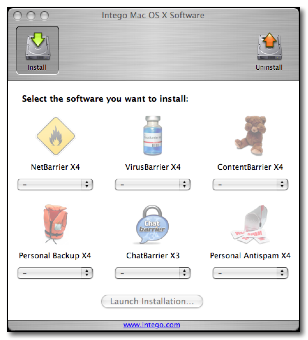
Internet Security Barrier X4 Platinum Edition is a 6-in-one package that contains NetBarrier X4, Personal Antispam X4 and VirusBarrier X4, Personal BackupX4 Edition, ContentBarrier X4 and ChatBarrier X4.
If you are concerned about security issues soup-to-nuts and donÕt mind the incredible performance hits from letting these apps run in the background, constantly notifying you of possible intrusions or Email as Spam, donÕt wish to surf the Internet much or do not want to view video streaming online, and are a parent that is completely untrusting of your childrenÕs access to any online content or in chat sessions and want to be a total control freak regarding computer use (scheduling availability per computer account), than this is the software for you!

 I was given Internet Security Barrier X4 and later
Personal Backup X4 and downloaded Content Barrier X4 instead of receiving a
copy of the Platinum Edition directly.
I was given Internet Security Barrier X4 and later
Personal Backup X4 and downloaded Content Barrier X4 instead of receiving a
copy of the Platinum Edition directly.
An earlier installation screen appeared on my system, which I donÕt sho. While reviewing the whole set of Intego apps, this later installation screen appeared. I understand why they set up the Intego apps and I appreciate also that they have an uninstall button, because I had to reinstall some of the apps. They didnÕt install correctly the first or second time, probably because I had other apps that may have been interfering with proper installation and had to turn them off. Think clamXav, etc.
Also each app required a serial number. One I was given originally for ContentBarrier X4 didnÕt work where the 5 kept turning into an S until I asked why it would not ÒtakeÓ and we discovered I had an invalid Serial Number, which was finally replaced.
Either way the apps are installed, they each require a reboot of the system and their own Serial Number.
Once everything is successfully loaded, running the NetUpdate X4 will eventually get this screen or one similar to it. Checking for updates can be calendared.
Notice that NetUpdate X4 is in alphabetical order while the Install window is not.
IÕll step through the Intego apps according to the Install List.

NetBarrier X4
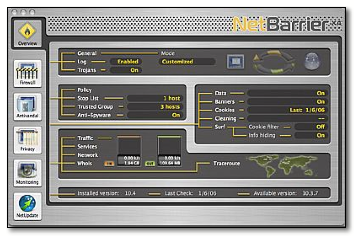
NetBarrier X4 does the firewall thing, and also adds the antivandal function that includes a stop list that gets updated as intruders are discovered. A privacy protection option filters data blocks banner ads, manage cookies, clean cache and history files and stealthifies the machine online.
A Data filter can be set up to protect sensitive information from getting out of the computer and going online. And a few monitoring tools are thrown in for good measure, including a monitoring screen saver, just to be different.
I was rather amazed at the number of Trojans this can flag in the firewall settings. IÕm also amazed they are not all on by default to be blocked.
The way Intego monetizes these apps isnÕt just the cost of the software up front. They also follow the same formula the other commercial anti-malware vendors in the Windows environment work, by offering annual fee services for updates. A fee-based Services feature does an expiration countdown as shown in the NetUpdate X4 window shown above.
More here: http://www.intego.com/netbarrier/ It costs $70 USD, if purchased alone.
VirusBarrier X4
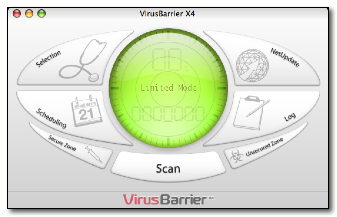
The VirusBarrier X4 is kind of cute to watch run. It follows the green radar-screen concept as it analyzes files. If it detects anything as it runs in the background, choices for alerts are either as a voice or as Email notification. And it works faster than clamXav.
The NetUpdate X4 does an expiration date countdown too. For VirusBarrier X4, they are Definitions and not Services.
More here: http://www.intego.com/virusbarrier/ It costs $70 USD, if purchased alone.
ContentBarrier X4
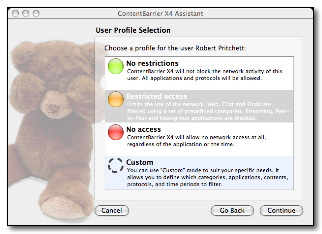
ContentBarrier X4 blocks just about everything. Restricted access stops programs like titan.tv (ElgatoÕs online TV program partner), iTube (Streaming apps), or our Blog backside, or YouTube content or anything with Flash streaming such as the backside of Xooma Worldwide or even the Apple Ads at apple.com!
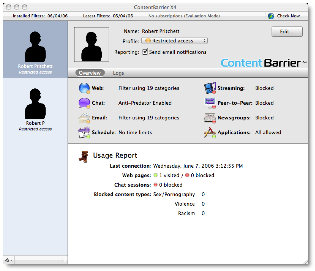
Okay, it does block everything, but an admin has to step through the configuration and the non-admin accounts need passwords. I mean, come on! You can even do start-stop times with this app for access. It is designed to block streaming media (bummer – as in, forget QuickTime), peer-to-peer software (no more BitTorrent), chat sessions (iChat, iChatAV), Email and application blocking. You really could get carried away here.
As can be seen, there are 4 levels of protection, Okay, three plus custom. I like the anti-predator in iChat sessions mode. And logs can be created per account. There is also automatic Email notification and search engine redirection. Traffic data can also be recorded for Internet use. So we really do have a Big Brother with this app. But I donÕt like being hobbled, but for many, hobbling is necessary with Sodom and Gomorra on the Internet. And apparently proxy server software can bypass this app, so it keeps honest people honest, howeverÉ
More here: http://www.intego.com/contentbarrier/ It costs $60 USD, if purchased alone.
Personal Backup X4

This app runs in either manual or automatic mode with backups to any storage medium and even can do the AES 128 encryption mode, if desired. The horizontal scrollbar goes to buttons from backup, Synchronize, Clone, Archive, Move, Restore, Documents, Home, Movies, Music, Pictures or New Script for doing AppleScript customized functions. Or Drag&Drop from Source to Destination. It does one thing at a time.
More here: http://www.intego.com/personalbackup/ It costs $70 USD, if purchased alone.
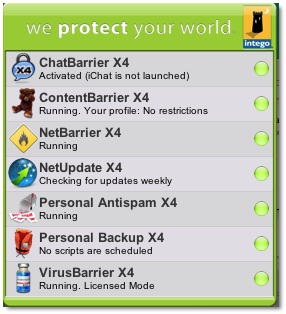
Along with this come two Widgets for Dashboard, one showing current script status and the other showing status of all Intego software running on the machine.
ChatBarrier X4

If you are concerned about iChat intrusions and need to encrypt content, it is possible if the other person(s) is/are using ChatBarrier X4 as well, so the information can be decrypted. It comes with 2 licenses so you wonÕt feel like a person with one hand clapping.
More here: http://www.intego.com/chatbarrier/
It costs $40 USD, if purchased alone, so itÕs $20 USD per license. I wonder how soon Apple will add encryption to iChat with Leopard? I would.
Personal Antispam X4
When Email is running a Spam Detected icon pops up onscreen. I noticed that sending Email slows down considerably as a result of activating this app. Okay, I had to open Mail.app and run the configuration for the Antispam function so I could export Email.
The Personal Antispam X4 takes over the Mail.app junk filter (grayed out) and creates its own Spam folder where items are sent when identified. Each time there is an item that has been identified in any of these security apps, a loud bizzzt sound comes out of the computer and an Intego Widget appears. The noise is the same as a game buzzer heard on the court of a school game of basketball.
ItÕs an app full of intelligent filters that are updated online through NetUpdate X4 Services, which will require an annual fee if you want it kept up-to-date. I actually like it!
Works with either Mail.app or Microsoft Entourage. And a semi-translucent widget-like popup appears every time an errant Email arrives. Then it puts that baddies in a bit-bucket Spam folder instead of unto the Junk folder.
More here: http://www.intego.com/personalAntispam/ It costs $50 USD, if purchased alone.
So there you go, six software apps from Intego for the security-minded paranoids, seven if you include the NetUpdate X4. And you donÕt mind having performance slow down or you donÕt mind being a parent Nazi, if more than one person uses the machine.
Is piece of mind worth $150 USD up front and $30 USD per service, per year thereafter? For me that means 4x$30 USD next year.
 You decide. Someone I highly respect, who makes
software for a living, ran the apps, saw the performance and response on his
system drop dramatically, so he removed everything. The pain for him wasnÕt
worth the gain. I have kids. There is lots of stuff on the Internet I donÕt
want or need to see. I hate Spam. I also have other alternatives that donÕt
cost as much. But if you want a one-stop-shop for all your so-called security
needs, give Intego a try.
You decide. Someone I highly respect, who makes
software for a living, ran the apps, saw the performance and response on his
system drop dramatically, so he removed everything. The pain for him wasnÕt
worth the gain. I have kids. There is lots of stuff on the Internet I donÕt
want or need to see. I hate Spam. I also have other alternatives that donÕt
cost as much. But if you want a one-stop-shop for all your so-called security
needs, give Intego a try.
