
Adobe Acrobat 8 Professional [AA8 Pro]
Reviewed by Harry {doc} Babad and Robert L. Pritchett
http://www.adobe.com/products/acrobatpro/
Requirements: PowerPC G3, G4, G5, or Intel processors, Mac OS X v.10.4.3, 256MB of RAM (512MB recommended), 1,060MB of available hard-disk space, 1,024x768 screen resolution and a DVD-ROM drive, universal binary. Audience: All users requiring a powerful and intuitive PDF creation and Manipulation tool accompanied by on-line collaboration features. A Standard version for the Macintosh may have been released by the time you read this. Strengths: The new interface is more comfortable for Macintosh to work with and some of the enhanced features work well for users interested in using AA8 Pro as a review tool. All the items for which I’d previously used AA7 Pro worked correctly, and are smoother in AA8 Pro Weaknesses: The preferences for this product still look like something an Wintel IT wienie dreamed up, and the combination with its complexity and a lack of any reasonable help files leave the user in a trial and error mode…mostly error. In addition some of the new interface features are counter productive and not intuitive. |
|
Experienced Users
New Users |
|
Harry tested the software on a 1 GHz dual processor PowerPC G4 Macintosh with 2 GB SDRAM running under OS X 10.4.8. Robert uses a 1.8 GHz iMac G5 with 1 GB SDRAM. |
|
Product and company names and logos in this review may be registered trademarks of their respective companies. |
|
 Price
Price


Publisher’s Product Description
Adobe Acrobat 8 Professional software enables business professionals to reliably create, combine, and control Adobe PDF documents for easy, more secure distribution, collaboration, and data collection. Combine files from multiple applications, collaborate on documents via e-mail or server, and collect information with electronic forms. Protect sensitive information with passwords and permissions.
Macintosh feature parity in Acrobat 8 now includes many workflow items that will improve the way that professional designers and business professionals, as well as general business users work with the product. Using the “five Cs” (Control, Create, Collect, Collaborate and Combine) as its guideline, Adobe said that features were not only added, but they also responded to the challenge to make the features more understandable and more broadly accessible. Thus, the update enable users of Adobe Reader software (version 7.0 or 8) to participate in document reviews, fill and save forms, and digitally sign documents.
Introduction
As a long awaited update to Acrobat Pro 8 [AA7 Pro] Robert and I jumped at the chance to test this product. We both have been heavy users of AA7 Pro, Robert focusing on the software to prepare macCompanion for web publication and downloads. I, as you know, focusing both on tuning recipes and exchanging complex technical information associated with nuclear waste management.
In preparation for the review we accepted the offer of an audio-video conference call where we were presented with the new features of Adobe Acrobat 8 Pro after we had been permitted to work with it for a little while. Prior to being briefed and tutored, we had both worked with the new product for several weeks. Since we weren’t sure of how we’d like the new version we both kept AA7 Pro installed on our hard drives {more about the later.]
TIP: In addition to this review in which Robert Pritchett and I share our experiences with AA8 Pro, I have, in this issue of macCompanion, posted a review the Visual Quickstart Guide for Acrobat 8 … it’s not a missing manual, but does a great job in expanding your horizons on this fine product. I found the guide useful despite having learned to use Acrobat and Acrobat Pro as version 5-7. Their interface, alas, was not conducive to exploration of the earlier version’s features. Unlike Robert, I rarely do the PC-Windows thing and then only in MS Word. |
Initial Experiences
Installing this application is simple. Open its .dmg, and drag it you’re your applications folder. You then go through the registration/installation windows until you’ve both satisfied Adobe that you’re legal, and to cycle though some tutorials if you want to. There is also an opportunity to tweak some preferences, but most of customizing AA8 Pro is done when you want to, as you work. [Harry notes that the new interface is slick…pure Mac – Harry had to initially stop for a minute to admire the new user interface before getting started with it.]
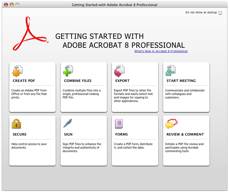
When you first start up Acrobat 8, you meet the new "Getting Started" window, as seen below. It’s a minor nuisance to experienced users, but it’s easy to get rid of, until its needed again. There is also a tutorial available that will serve to help newer users.
|
|
Activity Startup Screen |
Tutorial Screen |

“The biggest change can be seen when you dismiss this window and look at the screen. In the image below, the top of the image is a screen shot from Acrobat 7. The lower part is a screen shot from Acrobat 8. Notice the difference?

“Yup, all of the icons and tools that seemed to fill up our screen real estate are now gone. Now, all you see are the menus. While this would normally have elicited bravos and cheers from many users far and wide, alas, these buttons have not gone away, they have just "moved." [Gary Coyne’s words from AppleLinks, December 24, 2006. http://www.applelinks.com/index.php/more/review_adobe_acrobat_professional_8/
More on where they’ve go later in this review. Back to our initial experiences.
Robert Sez – “Don’t run both AA7 and AA* on the same machine!”
My initial experiences with AA8 Pro were not positive. AA8 was acting like early beta software for me. The software was slow, and at times prone to crash. I assume, an assumption borne out during my further testing, was that this occurred because AA8 uses the same Preferences and files as AA7 Pro. This allows software function conflicts of sorts to occur and well as the observed noticeable loss of speed for doing things; AA8 Pro crawled when compared to AA7 Pro. I tried to get two issues of macCompanion out the door using AA8, but darned if the document links didn’t take forever to get processed within each issue — other actions were gave me the dreaded “beachball of death”.
I then was forced to do some checking on whether the performance of AA8 Pro could be improved by de-installing AA7 Pro. [At the time, none of the blogs I checked mentioned this problem.] I detail that effort in the Post Script attached to this review.
What a little bit of scripting can do With AA8 Pro
When I reran the preparation of January issue from MS Office Word to PDF and AA8 Pro ran without a hitch. YEA-AHS! So, what would it have taken for the programmers at Adobe to run a script to look for AA7 and do a compensating upgrade, humm? I’ve been struggling with this “non-issue” for nearly 2 months? A clean install was all it took. I’m sure Adobe can’t lay the blame for this problem outside their door this time.
 Harry Sez…
My initial experience was smoother, all the PDF manipulation he tried works and I was able to duplicate all of the items reported in the Internet Recipe Hunting and Recipe Reformatting Tips articles. In addition, I converted several technical paper to PDF from MS Word, as well as practiced commenting on papers downloaded from a technical conference website, papers I was the designated reviewer.
Indeed, the interface was so smooth, that I even starting working with forms, a new experience. Creating active forms including those that can be worked by Acrobat Reader turned out to be easy, as was modifying and accessing a scanned form so that it could be filled in using the Form Menu tools including that for Run Form Fields Recognition or the Typewriter tool feature. During this review, I actually received several forms (meeting registration, product evaluation and one associated with choices for future directions of a group I volunteer from. There were not complicated forms, and I easily converted the scanned PDF to a form I could fill in and electronically return. This is a task I rarely attempted to do in AA7 Pro, and which I’d previously failed.
I de-installed AA7 Pro using AppZapper, which seemed to improve performance of AA8 Pro, but had no other affect on the application. I just zapped the application paying no attention to the proposed list delete list, after all, if all went badly, a clean install was always possible. [It was not needed.]
Working With
There are a number of features of the new version that are both strange, useful and others at times bothersome.
 Tool Bars Attached to Documents, Yuk — The AA8 Pro toolbars can no longer be docked anywhere but in the
window. I preferred the permanently locked under the Menubar. The problem
— we’ll you open three or four PDFs on a 20” monitor at 100% zoom and see
what you get. Isn’t it great to see so many toolbars? The workaround, but why
should you need one, you can clear this mess by Show-Hide toolbar --- F8 or re-access the toolbar via control clicking
on a two button mouse. Dear Adobe, this is a Macintosh application, why bring
the window interface woes to us?
Tool Bars Attached to Documents, Yuk — The AA8 Pro toolbars can no longer be docked anywhere but in the
window. I preferred the permanently locked under the Menubar. The problem
— we’ll you open three or four PDFs on a 20” monitor at 100% zoom and see
what you get. Isn’t it great to see so many toolbars? The workaround, but why
should you need one, you can clear this mess by Show-Hide toolbar --- F8 or re-access the toolbar via control clicking
on a two button mouse. Dear Adobe, this is a Macintosh application, why bring
the window interface woes to us?
Easier to Create Live Links for Navigation and Access to the Internet — Capture MS Word or Website Page Contents with active Live Links by using the provided plug-in You can also create Live links in ordinary PDF files, to ease reader navigation both with, between individual documents. This feature, for creating hyperlinks to parts of long documents, worked better for me than a comparable capability in MS Word. If word has the ability to hyper link content between documents> I’ve not found that feature {doc}.
Customizing Toolbars — Hurrah, we can finally customize my toolbars, and have them all in one place; no scattered floating pallets. Now why can’t you do the level of customization that you get with Office 2004? Alas, when one clicks on the "master" checkbox for a toolbar, like the Page Navigation Toolbar, you don't automatically select all of the options for that toolbar. Initially you get only what Adobe has decided you the average user should get. To select more individual tools or all tools in a toolbar you check each tool Individually. That’s right, do it manually.
Form Design Made Easier — One of the great new features in Acrobat 8 for forms designers is a command in Acrobat 8 Professional called Run Form Field Recognition. You simply open a PDF converted from just about any program and select Forms>Run Form Field Recognition. Acrobat then magically adds form fields to your PDF file. And it handles the field additions in an instant. Run Form Field Recognition does a super job on simple forms and it recognizes most text fields, and adds digital signature fields. However, as has been pointed out by a number of bloggers, the Run Form Field Recognition feature in Acrobat isn’t perfect and often misses checkboxes and radio buttons and it really falls apart when trying to recognize fields on complex and graphically intense forms.
Combine and Optimize Documents — Combine documents, drawings, and rich media content into a single, polished Adobe PDF document It’s easy to assemble documents, spreadsheets, presentations, e-mails, web pages, forms, CAD drawings, and diagrams into a single Adobe PDF document. Optimize individual and package file size and arrange the files in your preferred order. This holds true regardless of file type, page (paper) dimensions, or orientation. You can embed multimedia, 3D designs, audio, and video into your “super document” package for a richer user experience. The new AA8 5 Pro feature we fully appreciate is the ability to combine (as opposed to doing a merge) supported file formats into a PDF package. You can stitch together a group of documents into a single file and send it around, but each file can be saved independently - nice for portability.
During the packaging process, you can opt to remove headers, footers, and watermarks from the original files and add single unifying identifiers to each page. [We did notice that if you combined a set of documents into a single PDF, the originals disappeared. If this is a problem, the work around, not noted in the AA8 documentation is to merge the documents via the insert tool [Document > Insert Pages {Command-Shift-I}]
Smoother and More Fault Free Conversion of Web to PDF — When I converted a complicated web page (capturing two layers) to a PDF file, AA8 Pro was significantly faster than AA8 Pro and it showed fewer error messages in the status dialog box. With the new version, I did not have time to go downstairs and make a cup of coffee {doc}.
More Smoothly Create Adobe PDF Documents — Create Adobe PDF documents with one-button ease from Microsoft Office applications. Windows user, no not Macintosh users, can also create Adobe PDF documents from Outlook, Internet Explorer, Project, Visio, Access, Publisher, AutoCAD, and Lotus Notes.
This limitation is not due to any fault of the Adobe developers. Rather, in Office for Windows, there is a well documented API that allows developers to pass information to Word or PowerPoint to be rendered and produce the export into those file formats for our Windows version of their software. On the Mac, there is no API for Office for Mac; hence this it is limitation that is not easily or safely overcome to produce the comparable exports. Perhaps the new xml-based MS Office file format now under development by Microsoft will help on the Mac side, when the next version of Mac Office is released.”
Security Related — Many security aspects of AA8 Pro, according to Adobe, have been enhances to meet industry-specific requirements regarding information sharing. New tools allow users to permanently remove sensitive text, images, metadata, and other information in an Adobe PDF document. As an aside, nowhere in the documentation has Adobe told use what standards were complied with in this new version of Adobe Acrobat 8 Pro. We could not easily check the robustness of the security features for this review. [Robert]
Discomforts and Irritations
Dead Keys, Not the Macintosh Way — The home and end keys don’t work, shame, shame. There are toolbar substitutes for navigation, but that more mousing around. Humbug!
Zoom the Toolbars Change their Appearance and Tool Locations — Every time I change document window size (zoom settings); to minimize the grey spaces on the sides of my screen or make thing easier to read, the customized toolbar items change their position. Humbug, in MS Word no matter how fancy the toolbar, the tools stay in place if you zoom to a large size. [I hate hunting for my favorite tools. The problem is based on the fact that the toolbars are attached to EACH document rather then to the menubar, so when you change magnification items more around {doc}.
Changing Names of Files or Moving Them in Mid-Edit — Don’t! Habits die slowly, even good ones. At times because it works so well in MS word, I change the name of a PDF file I’m working with to something more suitable. Alternatively, I move the file into a folder where it belongs, again while it is still open and likely unsaved. Bad move, doc! Neither AA7 or AA8 will not allow you to save that file until you’ve either put it back where it belongs, changed the name back to its original (if you can remember it) or both. Even moving saved files at times breaks the file path chain. Is this Wintel thing? Your only option is to force quit the application, losing what ever you’ve changed and not saved {doc}.
Default Facing Pages View Is (almost) Gone — “The removal of the default Facing Pages view falls into the Ghastly Improvement category. In earlier versions, when you switched to a Facing Pages view setting, you saw the pages correctly laid out; that is, the first page is shown on the right with the pages facing each other in correct sequence. In the new version, the opening page defaults to being shown on the left and the subsequent pages face the wrong recto and verso. For us print-oriented folks, this new view (called Two-Up instead of Facing) is worthless -- we can't check spreads or page balance.” (Susan Glinert Stevens in a CreativePro.com Review).
“Then Susan who reviewed the PC version for CreativePro.com received an email message from Adobe. The message said that said that Facing Pages still exists, but you have to select Show Cover Page During Two-Up from the View/Page Display menu. “Too bad that I have to select this option for every single document. It cannot be the default. And why obscure a feature that print production people use all day long? Bah.” Susan’s review is at http://www.creativepro.com/printerfriendly/story/25008.html/.
Wimpy Help Files — I’ve reviewed many shareware applications that have more robust help files than this product. Although the help files were useful to me, an experienced user, a newbie would have trouble learning and using this application from them. Even thought there is lots of information about problem solving or learning about the products rich features on the Adobe website, it is not organized in a user-friendly fashion. That’s why help files exist {doc}.
Alas for the beginner user, O’Reilly Press will not be releasing a Missing Manual for this product, but the Peachpit Quick Start Guide, reviewed in this issue is helpful. Despite interface differences and enhanced features, even the book How to Do Everything with Adobe Acrobat 7.0 by span style='font-weight: normal'>Doug Sahlin [macCompanion June 2006] was helpful on the occasion I need more information about using a feature in AA8 Pro. This is an almost fatal flaw. The help terse, and at times confusing help files provided with AA8 Pro where particularly with respect to the on the functions of the items in the Preferences Panes.
No, folks, according to David Pogue of Pogue and O’Reilly Press, there will not be a “Missing Manual” book on AA8, so I’m going to have to get another source to learn from. |
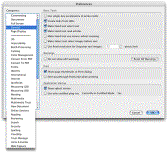
Alternatively, as noted on a recent blog: “At some point, they Adobe) have to restructure the preferences. It's getting just a little ridiculous. I mean seriously, when the simplest settings pane has 2 drop-down lists and 4 checkboxes, and there are thirty-three separate panes, you need a redesign.” John C. Welch November 26, 2006; http://www.bynkii.com/archives/2006/11/ {doc}
Missing Features That We’d Relish - Sez Harry
Create New/Added Keyboard Shortcuts — Users need a way to create keyboard shortcuts for AA8. Apples preferences based tool [Keyboard & Mouse > Keyboard Shortcuts] doesn’t work and I’ve not yet tried any of my other macro tools. My, needs are simple [e.g., Command-Shift E to export a pages from a file.]
Relocating Tools on the Toolbar — Hurrah, I can finally customize my toolbars, and have them all in one place; no scattered floating pallets. But I’d really rather have the flexibility I have in MS Office. I want to be able to actually move individual tools in the {collection of) toolbars, to group them my way – they way I use them. [Specifically, I want the Hand, Select, Touchup Text and Touchup Objects tools together. That’s the grouping I use for editing PDF files.] Such a tool relocation feature is a normal part of MS Word; if Microsoft can do it surely Adobe can too. And if I want to enhance my toolbars, in a manner different from Adobe’s default tools group setting, this must be done manually, adding one tool at a time to an individual toolbar [Tools > Customize Toolbars…].

Macro Tools for Repetitive Editing Actions — MS Word allows this as does Excel. Need we say more?
Conclusions
Every new version of Acrobat redefines the Adobe approach to the user interface, file format choices and editing capabilities. But all the changes are not always for the better. Yes, had I an available preview copy of this program for testing, as a user {not a reviewer) prior to making a purchase, I would likely upgrade my AA7 Pro, despite many of the disappointments Robert and I have found and shared in this review.
For most users the fact that AA8 Pro does not integrate well with the Macintosh Version of Microsoft Office 2004; is troublesome, but there are enough workarounds that it is not a fatal flaw. As previously mentioned, it’s a MS API problem.
More broadly, for composing long PDF packages in an office that requires security and wants to use the new digital forms, do document peer reviews, Acrobat 8 Pro is a solid and useful tool. Using AA8 Pro’s Combine and Optimize documents features was also a pleasure, particularly the new ability to create “super document” packages. It is also the best tool I {doc} has found for editing or enhancing PDF’s created by others or downloaded from the Internet. However, it's an expensive overkill if you only seek to create short documents to PDF files.
Finally from a Macintosh users perspective, although "there are some very good to excellent feature updates in Acrobat 8, as noted by AppleLinks’ Gerry Coyne. However, they are shrouded by an interface that gets in the way more than it welcomes you in." [http://www.applelinks.com/index.php/more/review_adobe_acrobat_professional_8/]
PS:
Robert Shares the Price We Pay Installing and Uninstalling AA7/8 Pro Files
To determine where the source of my initial problems were I did some uninstall, reinstall tests on AA7 and AA8 Pro, I first used Adobe Acrobat 7 Pro’s uninstaller and got 163 item that were either removed or were supposed to be installed and weren’t.
REMOVED: /Users/rpritchett/Library/Application Support/Adobe/Acrobat REMOVED: /Applications/Adobe Acrobat 7.0 Professional/Adobe Acrobat 7.0 Professional.app REMOVED: /Applications/Adobe Acrobat 7.0 Professional/Acrobat Distiller 7.0.app REMOVED: /Applications/Adobe Acrobat 7.0 Professional/ReadMe.html File not present: /Applications/Adobe Acrobat 7.0 Professional/ReadMeJ.html File not present: /Applications/Adobe Acrobat 7.0 Professional/ReadMeCT.html File not present: /Applications/Adobe Acrobat 7.0 Professional/ReadMeCS.html |
Sample of Files Deleted |
When I checked the contents of the AA8 package installed on my computer, I noticed that many of the files in AA8 were identical to AA7. After de-installing AA7, I checked the AA8 folder and saw the AA8 app itself was missing in action, again, a curious thing, but I ran the AA8 uninstaller anyway. It’s a test, isn’t it?
Ahah! By the length of this uninstall log, I could see that the files that did appear in MS Office 2004, the PDF tools, were somehow linked through AA7 instead of AA8. Like these were the cause of my problems. I could reinstall AA8 and see if I could get a better response from the new software on my machine.
The installer asked if I wanted to include the extras, such as the toolset in MS Office, the Adobe PDF Printer and the PDFViewer Safari plug-in. I didn’t remember seeing this Install Extras window the first time, but it must have been there, right? And of course, all Microsoft apps had to be turned off for AA8 Pro to install correctly.
I reran the January issue converting it from MS Office Word to PDF and it ran without a hitch. YEA-AHS!
