
MarsEdit
Reviewd by Michael Potter
Developer: Daniel Jalkut Red Sweater Software Acquired: 22 February, 2007 http://www.red-sweater.com/press/MarsEditAcquisition.html $25 USD Forum: http://www.red-sweater.com/forums/viewforum.php?id=6 System Requirements: Mac OS X 10.3.9 or later; Universal binary; 6MB Hard Drive Space. Strengths: Easy to set up, small footprint, decent multi-blog organizational tool. Weaknesses: Creation and editing of blog entries is weak. |
|
For a 30-day demo of this product: http://www.red-sweater.com/marsedit/ |
|



Introduction
Stretching back into the early 80’s the concept of posting summarized information, whether it be of a personal nature or the aggregation of news from multiple sources, is not new. Blogs themselves, as we might recognize them today, began as refinements of the online diary. With the advent of online posting tools such as LiveJournal, Blogger and others, blogging became less labor intensive and evolved into a place on the Internet designed to make the dissemination of ideas easier for the masses. Sure, many decry the existence of blogs as proof the “million monkeys” theory is false, however, I’m a fan of blogging even if not a big blogger myself. Blogs have progressed from being a sub-page of a much larger site to becoming the site itself; the exclusive home page for many who otherwise would have no interest or skill to create an entire site from scratch. Without blogging, many of my friends and family members would be unable to share their thoughts, pictures, spoken word and even video, as easily as they can now. Though blogs continue to provide a way for writers and poets to test new ideas and techniques, most recently, they’ve evolved yet again to become well respected and reliable sources of information from major news organizations and smaller independent journalists alike.
However, despite the many advances over the years, for some, maintaining a blog can still be a chore. The web based interfaces are often slow (or worse, down for “maintenance”) and, more critically, the inability to work “offline” is a hindrance to many -- there’s nothing worse than when the Muse knocks on your door and you’re not able to answer! Certainly the option exists to compose your entry in your favorite text processor, but when you go back online and the final words are pasted into the compose window, many times the formatting is lost and now your efforts have doubled.
Enter MarsEdit. MarsEdit seeks to resolve these difficulties and improve upon them at the same time by adding organizational tools to your arsenal that make creating and maintaining multiple blogs easier and less time intensive.
Getting Started
Installation of MarsEdit is straight forward. A simple drag and drop of the small 6 MB program to the Applications Folder shortcut provided in the Disk Image is all that’s needed.

The first time you run the program, you’ll be greeted with a user-friendly Getting Started dialog box:
Though many other weblog editors offer this same feature, I’ve not had one work as well or as seamlessly as MarsEdit’s does. After typing in the Weblog name and URL, MarsEdit prompts you for the username and password and then immediately downloads all recent posts from your blog as well as your settings such as tags you’ve set up in the system.
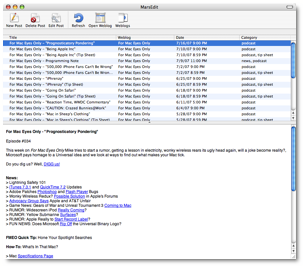
The main interface is sparse – but in a good way – containing only a handful of buttons needed to get started with your blog. The lower half of the window contains a Preview area to give you a rough idea of what your post will look like when published.
Clicking the Weblogs button opens a drawer with a list of the blogs currently set up in MarsEdit as well as access to the Drafts folder.
Using the Software
Since the main function of keeping a blog is writing and editing your words, I’m going to focus on that for this review.
The first thing you’ll notice when you compose a new blog entry is that Rich Text editing is conspicuously absent. Instead, you are typing in what amounts to be “plain text”. In truth, you’re coding HTML. If you want to, say, bold a word, you highlight it, drop down on the HTML menu and choose Bold. MarsEdit will automatically add the appropriate <b> </b> tags to your text. There are HTML tags for just about anything you’d want to do, but it’s definitely an old-school approach.
 In what is probably the most annoying (in a gnat buzzing
about your head sort of way) aspect of the program, it will not automatically
interpret your line breaks as you type, forcing you to utilize its Scripts menu
to “Add Paragraph Tabs.” After two or three entries, your brain will slowly
become hardwired to run this script before saving, but why should I have to?
Fortunately, if you forget to use the script to add the tags, save the draft
and then realize your mistake, MarsEdit is kind enough to remember that you
used breaks so you don’t have to go through manually entering them all again.
So, if it’s smart enough to do that, why can’t it add the tags on its own?
In what is probably the most annoying (in a gnat buzzing
about your head sort of way) aspect of the program, it will not automatically
interpret your line breaks as you type, forcing you to utilize its Scripts menu
to “Add Paragraph Tabs.” After two or three entries, your brain will slowly
become hardwired to run this script before saving, but why should I have to?
Fortunately, if you forget to use the script to add the tags, save the draft
and then realize your mistake, MarsEdit is kind enough to remember that you
used breaks so you don’t have to go through manually entering them all again.
So, if it’s smart enough to do that, why can’t it add the tags on its own?
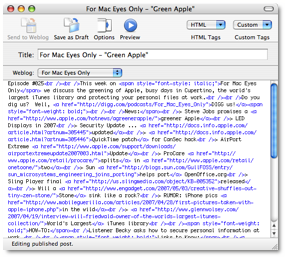
In a glaring example of how difficult to work with MarsEdit’s edit mode can be, here is an example of an existing blog entry I opened to modify:
There is a Preview button which works well to see your work in progress, but you can’t edit text in the Preview window. You do have the option to turn on “Live Preview” but that requires a constant shift in vision from one window to the other to ensure what you’re creating is coming out how you want it to.
I couldn’t even click in the Preview window to move my insertion point in the editing window nor could I double click text in Preview to have MarsEdit highlight the corresponding code in the editing window – which would be very handy in the jumbled mess above.
There is an option to insert images, but it doesn’t integrate with your iPhoto library so you’re stuck rummaging around your hard drive looking for the image you want to use.
A couple useful options found in the Post menu include “Add Technorati Tags”, “Edit Date” and “Edit Enclosure”. All of these work as expected, though any one of them could have been handled better directly in the editing window (such as the date) or perhaps as drawers off the editing window.
That’s one of the things I slowly discovered about MarsEdit: With the exception of Rich Text editing, just because you don’t see it, doesn’t mean it’s not there. Dig around in the menus and you stand a decent chance of finding what you’re looking for.
Conclusion
While it certainly makes organizing your blog much easier, it falls apart when it comes to making the creation of posts accessible for those I envision using the program. What should be an easy task, like embedding an image in your post, is several times more difficult than it should be, plus I shouldn’t have to use an external editing application to format my text. There’s a lot missing from MarsEdit in the usability department. A blogging tool – any tool designed to make life easier – should strive to be better than the tools it’s replacing. MarsEdit does not fit that bill.
Recommendation
While the organizational features of the program are nice, they hardly make up for the deficiencies in editing the posts themselves. On one hand it’s perfect for those who love to code in HTML – and ONLY HTML – but on the other, that’s not the sort of user who needs this program the most. My rating shows how conflicted I am with MarsEdit. While my gut told me to rate it lower, I can see how there might be some who really appreciate what it has to offer, even if what it offers pales in comparison to similar programs. Despite its “Universal Binary-ness”, MarsEdit feels like a hold over that hearkens back 10 years to when blogs were kept by hand. With more advanced web and blog editing tools at our disposal, my opinion is that MarsEdit will need to work that much harder to continue to be a viable option for the folks who “just want to keep a blog.”
I’ll take a look at it again when it hits the next major revision, but in the mean time, there are a number of other packages that do this same job and do it much better.
