
CSSEdit - A web-design tool
Reviewed by Daniel MacKenzie
Developer: Jan Van Boghout Space Carrot BVBA Rodestraat 10 B-2000 Antwerpen Belgium http://www.macrabbit.com/cssedit/ Released: April 2007 $30 USD. Blog: http://www.macrabbit.com/blog/ Strengths: Easy to use, OS X design, lots of features. Weaknesses: None. |
|



Introduction
 I am relatively new to web design and I wanted to check
out some applications. I hope to start my own web site design business but I
needed to learn the languages. CSS was one of them. I stumbled upon this
application while I was on the Apple website and it caught my attention. It is
great! It’s an easy way to make Cascading Style Sheets a lot faster.
I am relatively new to web design and I wanted to check
out some applications. I hope to start my own web site design business but I
needed to learn the languages. CSS was one of them. I stumbled upon this
application while I was on the Apple website and it caught my attention. It is
great! It’s an easy way to make Cascading Style Sheets a lot faster.
Getting Started
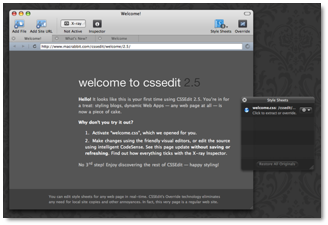
The installation, like most apps these days, was just dragging it into the Applications folder. Nothing else to it. The first time you start the application, there is a sample CSS sheet of which you can play around with. A preview screen pops up which is tuned to the sample CSS sheet so you can edit it and see the changes.
Screenshots: http://www.macrabbit.com/cssedit/screenshots/
Using the Software
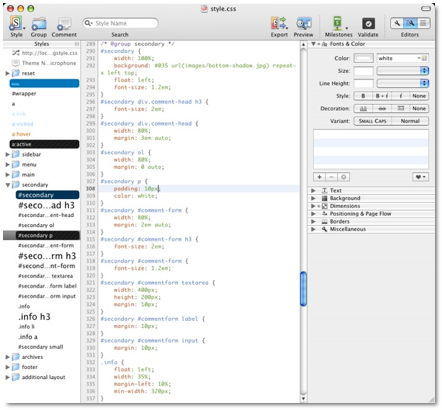
There are two main parts of the program; the preview window and the main programming window. Lets start with the main programming window. There is a programming window which lets you type in CSS codes manually or edit the things the program puts there. On the left of that, there is a lift of all of the different parts of the style sheet. On the right, there are buttons which you can click and the program automatically puts in the attributes. It makes constructing style sheets a whole lot easier. You have many options at the top of the screen. Create a group of styles, a new comment, a new style, etc. You also have the option to export the style sheet into multiple web documents at the same time. It work seamlessly. I put in a couple of HTML documents and hit OK. No loading period, it was just there. Very easy to use. Another feature is the Milestone feature. If you reach a certain point in your project, you can use this feature to make a save of the file at that time. If something goes wrong, you can revert back to it. It’s like a backup. There is a built-in validation system to validate your CSS. It is base upon the W3C standards for CSS. It works and looks beautifully.
The second window is a preview window. With this window you can load and examine any HTML document on the web or on your hard drive. This preview window lets you view multiple pages using tabs, lets you know how many style sheets each page has and an X-ray mode. This mode lets you examine each component of the site without using the source code. At the top, when you click on an element, there is a list of the elements that are associated with that component. It’s just another way to look at something.
Conclusion
This is an excellent product. All of these features make it a lot easier to create style sheets. Anyone who uses or creates style sheets would benefit enormously from this product. Excellent job, MacRabbit!
Recommendation
Anyone who creates style sheets should check out this application.
