
LapWorks Aluminum Desk Stand Review
Reviewed by Daniel MacKenzie
Lapworks HQ 7955 Layton Street Rancho Cucamonga, CA 971730 877-527-9675 http://www.laptopdesk.net/aluminumstand.html# $60 USD $62.78 CND £29.44 GBP €43.53 Euro Strengths: Comfortable, lightweight, travels well. Weaknesses: Rubber pads make the surface slippery. Other Reviews: http://www.laptopdesk.net/aluminumstand.html#reviews |
|



Introduction
In a previous issue I had done a review of a lap desk from LapWorks and I was disappointed. It was hot and uncomfortable. This laptop desk is much better. The position it puts your hands in is quite comfortable and ergonomically correct. I have enjoyed it.
 Getting
Started
Getting
Started
The product comes assembled so you don’t have to build
anything. There are 6 different inclines to a maximum of 45 degrees. You can
adjust it to so everyone should be kept happy. The desk stand is to be placed on
any hard surface and then the laptop onto it. If your laptop doesn’t have
rubber pads they have included four rubber pads which can be placed anywhere on
the metal surface. Then you can place your laptop on the stand.
Using the Hardware
I found it quite useful. My iBook fit onto the surface with no problems and I didn’t need the extra rubber pads because the iBook has four built-in. But after I put the pads on to test them, the laptop wouldn’t stay on the stand. The rubber pads made the surface more slippery! Now, it may just be the material that my iBook is made of. The bottom is rather slippery to begin with. Some other laptops are made of materials which may provide more traction.
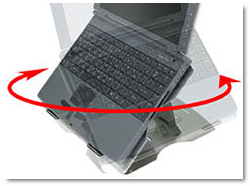 Anyway,
some of the other features have come in handy. At the bottom of the stand there
is a swivel which allows the stand to rotate 360 degrees. It is useful if you
need to show someone something if they are on the other side of the table. A
Neoprene carrying case is included with the product. It fits the stand perfectly
and doubles as a mouse pad if you have an external mouse. The case keeps the
stand clean and dust-free. Also, the way the laptop is lifted off of the stand
helps improve air circulation and reduce the temperature of the laptop.
Anyway,
some of the other features have come in handy. At the bottom of the stand there
is a swivel which allows the stand to rotate 360 degrees. It is useful if you
need to show someone something if they are on the other side of the table. A
Neoprene carrying case is included with the product. It fits the stand perfectly
and doubles as a mouse pad if you have an external mouse. The case keeps the
stand clean and dust-free. Also, the way the laptop is lifted off of the stand
helps improve air circulation and reduce the temperature of the laptop.
Conclusion
Overall, I feel this is an excellent product and can be useful to anyone who has a laptop used for typing on a desk. The swivel on the bottom is useful for showing clients and customers things. The only thing I think they should improve is to make the rubber pads more effective. Other than that, it is an excellent product.
Recommendation
I would recommend this to anyone who types on a desk with a laptop and anyone with a laptop with built-in rubber pads.
