
Elgato Turbo.264 Video Encoder
Reviewed by Wayne LeFevre
Elgato Systems, LLC 900 Kearny Street Suite 750 San Francisco, CA 94133 Elgato Systems GmbH Nymphenburger Str. 14 80335 München Germany Released: May 2007 $100 USD, € 100 incl. VAT |
|
Requirements: Mac OS X 10.4 or later; Universal binary; 512 MB RAM; QuickTime 7.1.5 or later; iTunes 7.1.1 or later; USB 2.0. Strengths: Very quick h.264 encoding with QuickTime or Any application using QuickTime export, Older the computer–more advantageous to use. Weaknesses: ffmpeg software encoding just as quick on newer computers, slow driver updates, not able to tweak files. No HD. |
|


Introduction
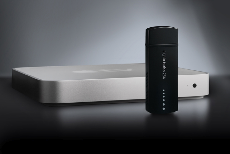
Turbo.264 is a powerful video encoder in the form of a compact USB 2.0 stick. Use the included software to convert your Mac videos one at a time or in a batch; The application drops the converted file(s) into iTunes for you, ready to synch automatically with your iPod, Apple TV or Sony PSP.
Alternatively, plug in Turbo.264 while you use the iPod or Apple TV export command of popular Macintosh video applications. Turbo.264’s hardware encoder jumps in to take over for your Mac’s processor, and does the hard work of encoding the videos to an H.264 format. Not only does Turbo.264 help get the job done faster, it frees up your processor for other tasks. Think of it as a “co-processor” for your Mac.
Getting Started
Installation was quick and easy. Truly, the older PowerPCs take huge advantage of the turbo.264. It will take approximately the same amount of time to encode a video with an older PPC as a new Intel Core 2 Duo. Unfortunately, my PowerBook Titanium has a USB 1.1 on it, so the turbo.264 is basically useless. Had it a USB 2.0, I would have been a great platform for encoding.
Using the Hardware
After plugging in the turbo.264 and installing the software, the actual encoding is as simple and quick as you can get. Simply drag and drop a video or videos into the interface window, pick Apple TV, iPod Standard, iPod High or Sony PSP, then press start. There are no other options to choose, and you cannot change the name, nor change or add to the queue once it has started.
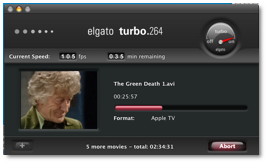
Apple TV will encode to H.264 Main Profile, 3 Mbps max., 800×600 max.,( No HD.) 30 fps max. Audio: AAC-LC, stereo, 128 Kbps, 48 kHz. If the source movie is larger than 800×600 it will be scaled to fit within 800×600 preserving aspect ratio. Resolution is maintained if 800×600 or smaller. Frame rate is maintained when 30 fps and smaller.
iPod Best will encode to H.264 Baseline Profile Low-Complexity, 1.5 Mbps max., 640×480 max.,( No HD.) 30 fps max. Audio: AAC-LC, stereo, 128 Kbps, 48 kHz. Same scale down as Apple TV if larger than 640×480.
iPod Smallest will encode to H.264 Baseline Profile up to level 1.3, 768 kbps max., 320×240 max.,( No HD.) 30 fps max. Audio: AAC-LC, stereo, 128 Kbps, 48 kHz. Same scale down as Apple TV if larger than 320×240.
Sony PSP will encode to H.264 Main Profile, 512 Kbps, 368×208/320×240, 30 fps. Audio: AAC-LC. Stereo. 128Kbps, 48 kHz.
Conclusion
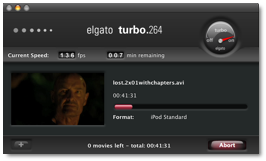 The turbo.264 works
as advertised, quickly converting all your video that would convert with
QuickTime and QuickTime applications, (iMovie, FCP, QuickTime Pro, etc.) with
little strain on your processor. Average fps encoding was anywhere from 40 to
50, with speeds reaching well over 100. In this episode I reached 136 fps and
the next reaching 105 fps, not too shabby. Processor never went over 40%. For
ease of use, it’s definitely a 5 star product. However, because you cannot
change any options, you cannot convert .mkv files, and it’s not quite up to
snuff with cheaper alternatives, I’m dropping the rating down a bit.
The turbo.264 works
as advertised, quickly converting all your video that would convert with
QuickTime and QuickTime applications, (iMovie, FCP, QuickTime Pro, etc.) with
little strain on your processor. Average fps encoding was anywhere from 40 to
50, with speeds reaching well over 100. In this episode I reached 136 fps and
the next reaching 105 fps, not too shabby. Processor never went over 40%. For
ease of use, it’s definitely a 5 star product. However, because you cannot
change any options, you cannot convert .mkv files, and it’s not quite up to
snuff with cheaper alternatives, I’m dropping the rating down a bit.
Recommendation

The show on the left was encoded with VisualHub 1.24 with the one on the right encoded with Elgato turbo.264. Both took approximately the same time on an Intel Core 2 Duo iMac. I would have to give a slight edge to VisualHub, one for its quality, two for being approximately $100 cheaper. VisualHub using ffmpeg for encoding seems to have slightly smoother gradations, with the Elgato making the movie slightly darker than the original.
 Elgato has beta
software in the works for this encoder, as they have for months now. No
difference I can tell using beta 1.0.2b9 from the latest release of 1.0.1 on
the website. I truly hope they can improve a bit on their software, making it
more interactive and encode better. Otherwise, unless you are still using a
PowerPC, I see no reason to stop using VisualHub and jump to the more expensive
Elgato.
Elgato has beta
software in the works for this encoder, as they have for months now. No
difference I can tell using beta 1.0.2b9 from the latest release of 1.0.1 on
the website. I truly hope they can improve a bit on their software, making it
more interactive and encode better. Otherwise, unless you are still using a
PowerPC, I see no reason to stop using VisualHub and jump to the more expensive
Elgato.
